ICS Viewer
See the events inside an .ics calendar file, merge files, export to CSV.

This converter turns a .vcf contacts file into a spreadsheet with one row per contact. It reads vCard 2.1, 3.0 and 4.0 files from phones and email apps, and downloads CSV or Excel. Nothing is uploaded: it runs in your browser.
Add your file
Drop your .vcf file onto the box above, or tap Choose files. You can add several files at once.
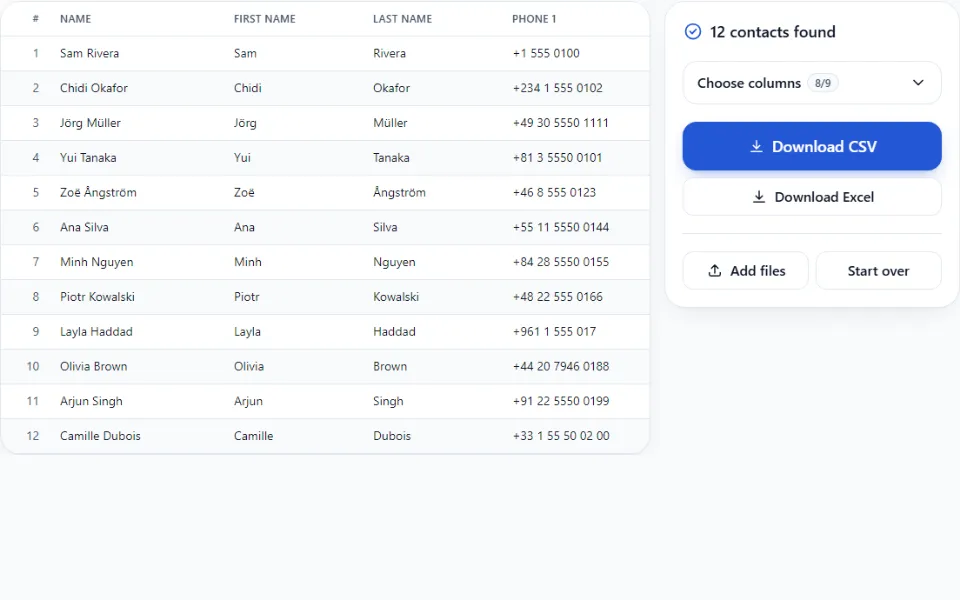
Check the preview
Every contact is one row, and every detail has its own column.
Pick your columns
Open Choose columns and keep only the details you need.
Download
Tap Download CSV or Download Excel. The file is saved to your device.
Already have a .vcf file? Skip ahead. If not, here's how to export one.
Other contacts apps, such as the one on Samsung phones, also have an export option, but the menu names differ.
Outlook exports contacts only as a CSV file, which is already a spreadsheet, so you don't need this converter for it. Open it in Excel or Google Sheets directly. To export: in Outlook on the web or the new Outlook, open People, thenExport contacts.
If someone emailed you a contact card, save the .vcf attachment and pick it here.
You get a spreadsheet with one row per contact and one column per detail. People with several phone numbers or emails get numbered columns (Phone 1, Phone 2…), each with a label column (Mobile, Work…).
| CSV | Excel (.xlsx) | |
|---|---|---|
| Opens in | Almost any app: Google Sheets, Numbers, CRMs, email tools | Excel, Google Sheets, Numbers |
| Phone numbers | Excel may reformat them when it opens the file | Kept exactly, including + and leading zeros |
| Accents and other alphabets | Shown correctly (UTF-8 with a byte-order mark) | Shown correctly |
| Extras | None | Bold header row that stays visible while scrolling |
| Best for | Importing into another app | Reading and editing in Excel |
.vcf file first (see the steps above)..vcf file.The file has no contacts in it. Check that it ends in .vcf. If you have a .csv file, it is already a spreadsheet: open it in Excel or Google Sheets.
Some exports come zipped. Unzip the file first, then add the .vcf file that was inside.
é, =C3=A9 or question marksThe converter repairs most of these automatically and says how many it fixed. If some remain, the file was probably damaged when it was first saved. Try exporting it again from the original phone or app.
If the file is stored in iCloud Drive, your iPhone may need to download it first. Open the file once in the Files app, then choose it again.
4.47E+11This happens when Excel opens a CSV. Download the Excel version instead, which keeps numbers as text.
Files full of contact photos can be hundreds of megabytes. On a phone, close other tabs, or use a computer.
No. Nothing is uploaded: your browser reads the file and builds the spreadsheet on your device. See how to check this yourself.
Pick Excel if you will open the file in Excel: phone numbers keep their + sign and leading zeros. Pick CSV for Google Sheets, Numbers, or importing into another app or CRM.
Older phones often saved contacts in a different text encoding. The converter detects this, repairs most names automatically, and tells you how many it fixed. If a name still looks wrong, tell us which phone exported the file.
They are left out, because a spreadsheet cell can’t hold a photo. Names, numbers, emails, addresses, birthdays and notes are all kept.
Yes. Add all the files at once, or add more with Add files. All contacts end up in one table and one download.
There is no contact limit. Files up to 300 MB in total work in most browsers. Tens of thousands of contacts preview smoothly, even on a phone.
vCard 2.1, 3.0 and 4.0. Together these cover files from current phones, email apps and older phones.
See the events inside an .ics calendar file, merge files, export to CSV.
Read an exported chat as bubbles, with photos and voice notes.